Mermaid C4 Diagrams: Architecture as Code Guide
Learn how to create C4 model architecture diagrams with Mermaid.js. Covers Context, Container, Component, and Dynamic diagrams with copy-paste examples for documenting software systems.
# Mermaid C4 Diagrams: Document Software Architecture as Code (2026 Guide)
Architecture diagrams age fast. The system evolves, the diagram doesn't, and six months later you're staring at a Lucidchart file that no longer matches reality. The C4 model fixes this by giving you a structured way to describe software architecture — and Mermaid.js lets you write those diagrams as code that lives next to your source.
This guide walks through Mermaid's C4 diagram support: what each level means, the syntax, and complete copy-paste examples for Context, Container, Component, and Dynamic diagrams.
What Is the C4 Model?
The C4 model, created by Simon Brown, describes software architecture at four zoom levels:
- Context — Your system as a single box, surrounded by users and external systems
- Container — The major deployable units inside your system (web app, API, database, queue)
- Component — The internal building blocks of a single container (controllers, services, repositories)
- Code — Class-level detail (usually skipped — generated from source)
Think of it like Google Maps: zoom out for the country, zoom in for the street. Each level answers different questions for different audiences.
Why Mermaid C4 Beats Drawing Tools
C4 diagrams in Lucidchart, Visio, or draw.io look great — until someone refactors. Mermaid's text-based C4 syntax means:
- Diagrams live in your repo next to the code they describe
- Pull requests update the diagram in the same commit as the architecture change
- Diffs are reviewable — you can see exactly what changed
- No license fees, no proprietary file formats, no broken exports
- Renders natively in GitHub, GitLab, Notion, and Obsidian
> ⚠️ Heads up: Mermaid's C4 support is still marked experimental as of 2026. The syntax works well in most renderers but may evolve. Always test in your target environment.
C4 Context Diagram (Level 1)
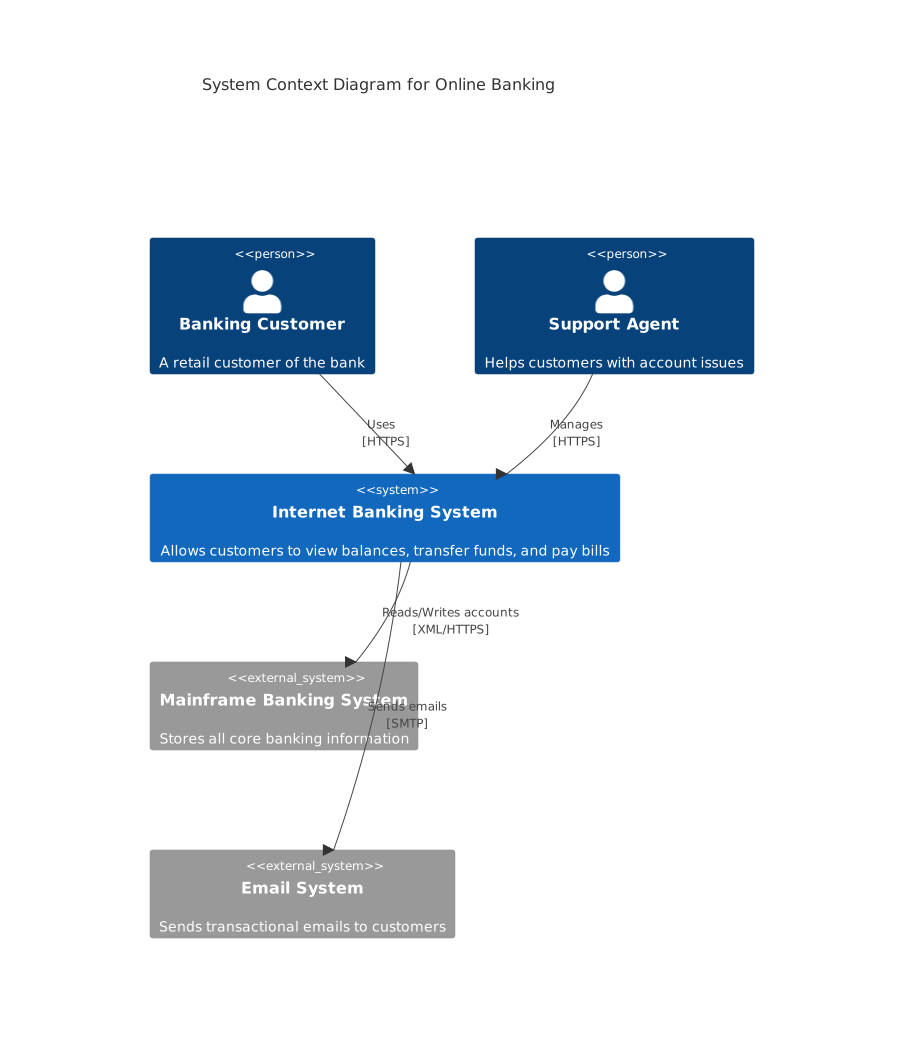
The Context diagram shows your system as a black box and identifies who uses it and what it depends on. This is the diagram you show executives, new hires, or anyone asking "what does this system do?"
C4Context
    title System Context Diagram for Online Banking

    Person(customer, "Banking Customer", "A retail customer of the bank")
    Person(support, "Support Agent", "Helps customers with account issues")

    System(banking, "Internet Banking System", "Allows customers to view balances, transfer funds, and pay bills")

    System_Ext(mainframe, "Mainframe Banking System", "Stores all core banking information")
    System_Ext(email, "Email System", "Sends transactional emails to customers")

    Rel(customer, banking, "Uses", "HTTPS")
    Rel(support, banking, "Manages", "HTTPS")
    Rel(banking, mainframe, "Reads/Writes accounts", "XML/HTTPS")
Rel(banking, email, "Sends emails", "SMTP")Key elements:
- Person() — A human actor (employee, customer, admin)
- System() — Your system, the one being documented
- System_Ext() — A third-party or legacy system you depend on
- Rel() — A relationship with a label and optional protocol
C4 Container Diagram (Level 2)
Zoom in one level and you see the containers — the runnable units that make up your system. A container is anything that needs to be deployed: a Spring Boot service, a Next.js app, a Postgres database, a Redis cache, a message queue.
C4Container
    title Container Diagram for Internet Banking System

    Person(customer, "Customer", "A retail banking customer")

    System_Boundary(banking, "Internet Banking System") {
        Container(web, "Web Application", "Next.js, TypeScript", "Delivers the banking UI")
        Container(mobile, "Mobile App", "React Native", "iOS and Android client")
        Container(api, "API Application", "Node.js, Express", "Provides banking functionality via JSON/HTTPS")
        ContainerDb(db, "Database", "PostgreSQL", "Stores user accounts, sessions, audit logs")
        Container(queue, "Message Queue", "RabbitMQ", "Async event processing")
    }

    System_Ext(mainframe, "Mainframe", "Core banking ledger")

    Rel(customer, web, "Uses", "HTTPS")
    Rel(customer, mobile, "Uses", "HTTPS")
    Rel(web, api, "Calls", "JSON/HTTPS")
    Rel(mobile, api, "Calls", "JSON/HTTPS")
    Rel(api, db, "Reads/Writes", "SQL")
    Rel(api, queue, "Publishes events", "AMQP")
Rel(api, mainframe, "Fetches account data", "XML/HTTPS")New elements:
- System_Boundary() — Visual boundary around your containers
- Container() — A deployable unit with technology and purpose
- ContainerDb() — A data store (renders with a different shape)
This is the diagram developers will use most. It answers "what runs where, and how do they talk?"
C4 Component Diagram (Level 3)
Go one level deeper and you're inside a single container, looking at its components — the controllers, services, and repositories that make it tick.
C4Component
    title Component Diagram for API Application

    Container_Boundary(api, "API Application") {
        Component(auth, "Auth Controller", "Express Router", "Handles login, signup, token refresh")
        Component(accounts, "Accounts Controller", "Express Router", "Account balance and history endpoints")
        Component(transfers, "Transfers Controller", "Express Router", "Money movement endpoints")
        Component(authSvc, "Auth Service", "TypeScript class", "JWT issuance, password hashing")
        Component(accountSvc, "Account Service", "TypeScript class", "Business rules for accounts")
        Component(repo, "Account Repository", "Prisma ORM", "Persistence layer")
    }

    ContainerDb(db, "Database", "PostgreSQL")

    Rel(auth, authSvc, "Uses")
    Rel(accounts, accountSvc, "Uses")
    Rel(transfers, accountSvc, "Uses")
    Rel(accountSvc, repo, "Uses")
Rel(repo, db, "Reads/Writes", "SQL")Component diagrams are useful for onboarding new engineers to a service or planning a refactor. Don't draw one for every container — only the ones complex enough to need it.
C4 Dynamic Diagram
Dynamic diagrams show how components collaborate to handle a specific scenario — like a user login or a checkout flow. They're numbered to show sequence.
C4Dynamic
    title Dynamic Diagram: Customer Money Transfer

    Person(customer, "Customer")
    Container(web, "Web App", "Next.js")
    Container(api, "API", "Node.js")
    ContainerDb(db, "Database", "PostgreSQL")
    Container(queue, "Queue", "RabbitMQ")

    Rel(customer, web, "1. Initiates transfer")
    Rel(web, api, "2. POST /transfers")
    Rel(api, db, "3. Validate balance")
    Rel(api, db, "4. Debit source account")
    Rel(api, queue, "5. Publish TransferRequested event")
Rel(api, web, "6. Return confirmation")Use Dynamic diagrams sparingly — for the two or three flows that everyone needs to understand.
Best Practices for C4 in Mermaid
1. Start at Context, stop at Container. Most teams never need Component diagrams. Don't over-document.
2. Keep one diagram per file. Store them in /docs/architecture/ next to the code:
docs/
  architecture/
    01-context.md
    02-container.md
    03-component-api.md
3. Update diagrams in the same PR as the code change. Make it part of your definition of done.
4. Use technology labels consistently. "Next.js, TypeScript" beats "web frontend" every time.
5. Name relationships with verbs. "Reads from", "Publishes to", "Authenticates against" — not just arrows.
C4 vs Plain Mermaid Flowcharts
A flowchart can render an architecture diagram — but C4 enforces a vocabulary. Everyone on the team uses the same words for the same concepts: Person, System, Container, Component. That shared vocabulary is what makes C4 valuable, not the visual style.
If your team is small and your system is simple, a plain flowchart is fine. The moment you have multiple services, multiple teams, or external auditors asking questions — switch to C4.
Conclusion
The C4 model + Mermaid.js gives you architecture documentation that actually stays current. Diagrams as code, version controlled, reviewed in pull requests, and rendered natively in every developer tool you use.
Start with a Context diagram for your main system this week. Add a Container diagram next sprint. That's usually enough — and it's infinitely better than the stale Visio file nobody opens.