Mermaid Sankey Diagrams: Flows, Budgets & Energy
Learn how to build Mermaid.js Sankey diagrams to visualize data flows, budgets, energy usage, and conversion funnels. Complete syntax guide with copy-paste examples.
# Mermaid Sankey Diagrams: Visualize Flows, Budgets & Energy Data
Sankey diagrams are the go-to visualization for showing how a quantity flows from one set of categories to another. Energy distribution, website conversion funnels, budget allocation, supply chains — anywhere a value splits, merges, or transforms, a Sankey diagram tells the story better than a stacked bar chart ever could.
The good news: since Mermaid.js v10.3, you can build production-ready Sankey diagrams in plain text, version-controlled alongside your code, no Tableau or D3.js required. This guide walks you through the syntax, common patterns, and real-world examples.
What Is a Sankey Diagram?
A Sankey diagram is a flow diagram where the width of each link is proportional to the quantity it represents. Wider arrows mean more flow. They were originally invented in 1898 by Captain Matthew Sankey to visualize steam engine energy efficiency, and they remain unbeaten for showing where things go and how much.
Classic use cases:
- Energy budgets — input fuel → useful work + losses
- Website analytics — traffic source → page → conversion
- Financial flows — revenue → departments → expense categories
- Supply chains — raw materials → factories → distributors → customers
- User journeys — landing page → signup → activation → retention
Mermaid Sankey Syntax (The Basics)
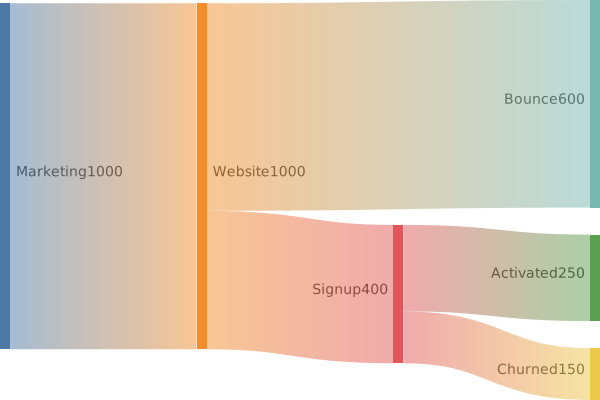
Mermaid uses a CSV-style format for Sankey diagrams. Each line is one flow: source,target,value.
sankey-beta

Marketing,Website,1000
Website,Signup,400
Website,Bounce,600
Signup,Activated,250
Signup,Churned,150That's it. No nodes to declare, no styling required. The diagram type is sankey-beta (still officially in beta, but stable in v10.3+).
A few rules to remember:
- Three columns per row: source, target, numeric value
- No header row — just data
- Quote labels with commas or spaces using double quotes:
"Paid Ads",Website,500 - Values must be positive numbers — Sankey diagrams can't represent negative flows
Real-World Example 1: Marketing Funnel
Here's a multi-stage acquisition funnel that splits traffic by source and tracks it through to paid conversion:
sankey-beta

"Google Ads",Landing,4500
"Organic Search",Landing,3200
"LinkedIn",Landing,800
"Email",Landing,500
Landing,Trial,2100
Landing,Bounce,6900
Trial,Activated,1400
Trial,"Trial Drop-off",700
Activated,"Paid Customer",420
Activated,"Free Forever",980In one glance you see: organic search and Google Ads dominate top-of-funnel, but only ~30% of activated users convert to paid. That's a clearer story than any spreadsheet.
Real-World Example 2: Energy Flow
The original Sankey use case — visualizing how a system uses (and wastes) energy:
sankey-beta

"Natural Gas","Power Plant",100
"Power Plant","Electricity",38
"Power Plant","Heat Loss",62
"Electricity","Buildings",22
"Electricity","Industry",12
"Electricity","Transmission Loss",4The widths instantly reveal that 62% of input energy is lost as heat at the power plant — the kind of insight a stacked bar chart hides.
Real-World Example 3: Budget Allocation
Quarterly budget breakdown for a small SaaS company:
sankey-beta

Revenue,Engineering,45000
Revenue,Marketing,28000
Revenue,"Sales & CS",18000
Revenue,Operations,9000
Engineering,Salaries,38000
Engineering,"Cloud Infra",7000
Marketing,"Paid Ads",18000
Marketing,Content,6000
Marketing,Tools,4000Great for board decks, investor updates, and internal alignment.
Styling and Themes
Sankey diagrams inherit Mermaid's theme system. Switch the theme with an init directive:
%%{init: {"theme": "dark"}}%%
sankey-beta

Alpha,Beta,10
Alpha,Gamma,20
Beta,Delta,8Available themes: default, dark, forest, neutral, and base (fully customizable). For brand colors, use the base theme with themeVariables:
%%{init: {"theme":"base","themeVariables":{"primaryColor":"#2563eb","primaryTextColor":"#fff"}}}%%
sankey-beta

Input,Output,100Note: link colors in Sankey diagrams are auto-generated from the source node — you currently can't color individual links manually. If you need that level of control, fall back to D3.js.
Where Mermaid Sankey Renders Natively
- GitHub Markdown — wrap in a
mermaidcode fence and it renders in any README - GitLab — supported in
.mdfiles - Notion — paste into a Mermaid code block
- Obsidian — works out of the box in preview mode
- Docusaurus & MkDocs — with the Mermaid plugin enabled
- VS Code — via the Markdown Preview Mermaid Support extension
If the platform supports Mermaid v10.3+, your Sankey diagram works.
Common Pitfalls
1. Cycles aren't supported. A Sankey is a directed acyclic flow. If A → B → A, the renderer will fail or produce nonsense. Restructure your data into stages.
2. Quote labels with spaces. Paid Ads,Website,500 will break. Use "Paid Ads",Website,500.
3. Mismatched totals look wrong. If 1000 enters node X but only 800 leaves, the diagram still renders — but the imbalance shows visually as a stub. Either accept it (it represents "loss" or "unaccounted") or balance your data.
4. Too many nodes = unreadable. Sankey diagrams shine with 5–25 nodes. Beyond that, group related items into parent categories.
When to Use Sankey vs Other Diagrams
| Use Sankey when... | Use something else when... |
|---|---|
| Showing proportional flow between stages | Showing process steps → use a flowchart |
| Comparing input vs output volumes | Showing time series → use xychart or Gantt |
| Visualizing funnels and conversions | Showing relationships → use ER diagram |
| Highlighting losses or splits | Showing hierarchies → use mindmap |
Conclusion
Mermaid Sankey diagrams turn flow data into instantly readable visuals — funnels, budgets, energy, supply chains — all in plain text that lives next to your code. The syntax is dead simple (source,target,value), it renders natively in GitHub and most documentation platforms, and you can ship a polished flow chart in under five minutes.
Next time you're tempted to embed a screenshot of a Tableau Sankey in your docs, write it in Mermaid instead. Future-you (and every reviewer of that pull request) will thank you.