Mermaid Bar Chart Syntax & Examples: Copy-Paste XY Chart Code
Mermaid bar chart syntax with copy-paste xychart-beta code examples. Multi-series bar charts, line charts, combo charts, axis config, and theming for GitHub Markdown.
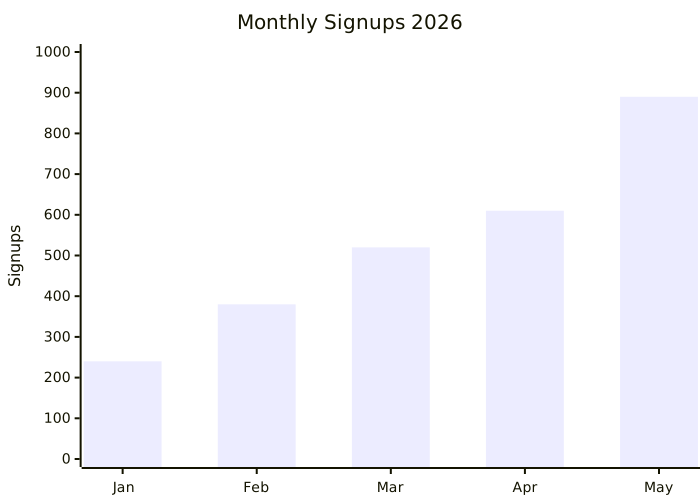
Mermaid bar chart example
Copy the mermaid bar chart example below. The image at the top is this XY chart rendered.
For years, Mermaid.js was the kingdom of flowcharts, sequence diagrams, and architecture docs — but if you wanted a simple bar chart in your README, you were stuck embedding a screenshot from Excel. Not anymore. Since v10.5, Mermaid ships with xychart-beta, a diagram type built specifically for bar charts and line graphs in plain text.
No D3.js. No Chart.js setup. No PNGs going stale every quarter. Just write the data, commit it, and GitHub renders a real chart inside your Markdown.
This guide walks you through everything: syntax, axis configuration, multi-series charts, theming, and where XY charts fit in your documentation stack.
What Is an XY Chart in Mermaid?
An XY chart is a 2D plot with an x-axis and a y-axis. Mermaid's xychart-beta supports two visualization styles:
- Bar charts — categorical x-axis, numeric y-axis
- Line charts — same axes, plotted as a continuous line
You can also combine them in a single chart (bars + a trend line on top) — exactly like Excel combo charts, but in version-controlled text.
Use cases that fit perfectly:
- Monthly revenue, signups, or active users in a status report
- Performance benchmarks (latency, throughput) in a tech postmortem
- Survey results or simple distributions
- Sprint velocity over time in retrospectives
- Cost trends in cloud billing reviews
Basic Syntax: Your First Bar Chart
Here's the minimum viable XY chart — a bar chart of monthly signups:
xychart-beta
    title "Monthly Signups 2026"
    x-axis [Jan, Feb, Mar, Apr, May]
    y-axis "Signups" 0 --> 1000
bar [240, 380, 520, 610, 890]Three things to notice:
x-axistakes a comma-separated list of category labels in square brackets.y-axistakes a label, then a numeric range withmin --> max.bartakes the data values in the same order as the x-axis categories.
That's a complete chart in five lines.
Switching to a Line Chart
Same data, swap bar for line:
xychart-beta
    title "Monthly Signups 2026"
    x-axis [Jan, Feb, Mar, Apr, May]
    y-axis "Signups" 0 --> 1000
line [240, 380, 520, 610, 890]That's it. Mermaid handles axis ticks, grid lines, and colors automatically.
Combo Charts: Bars + Line on the Same Axes
This is where xychart-beta starts to feel powerful. Stack a line on top of bars to show a trend:
xychart-beta
    title "Revenue vs Target"
    x-axis [Q1, Q2, Q3, Q4]
    y-axis "USD (thousands)" 0 --> 200
    bar [85, 110, 145, 178]
line [100, 120, 140, 160]Bars = actuals. Line = target. The visual story ("we're beating target") jumps out instantly.
You can stack multiple bar series too — Mermaid will color them differently:
xychart-beta
    title "Sprint Velocity by Team"
    x-axis ["Sprint 1", "Sprint 2", "Sprint 3", "Sprint 4"]
    y-axis "Story Points" 0 --> 80
    bar [45, 52, 48, 60]
bar [30, 38, 42, 50]Horizontal Bar Charts
Need bars going sideways (great for long category labels)? Use the horizontal orientation:
xychart-beta horizontal
    title "Top 5 Marketing Channels"
    x-axis ["Organic Search", "Paid Ads", "Email", "Referral", "Social"]
    y-axis "Leads" 0 --> 500
bar [420, 310, 240, 180, 95]The horizontal keyword goes right after xychart-beta on the first line.
Numeric X-Axis (Time Series Style)
For line charts where the x-axis is itself a number range — like time, version numbers, or load levels — use a numeric range instead of category labels:
xychart-beta
    title "API p95 Latency by Concurrent Users"
    x-axis "Concurrent Users" 0 --> 1000
    y-axis "Latency (ms)" 0 --> 500
line [80, 95, 130, 180, 240, 310, 380, 450]Mermaid distributes your data points evenly across the numeric range.
Theming and Colors
XY charts inherit Mermaid's theme system. Switch themes with an init directive:
%%{init: {"theme": "dark"}}%%
xychart-beta
    title "Dark Mode Chart"
    x-axis [Mon, Tue, Wed, Thu, Fri]
    y-axis "Errors" 0 --> 50
bar [12, 8, 22, 5, 18]For brand-specific colors, override xyChart theme variables:
%%{init: {"themeVariables": {"xyChart": {"plotColorPalette": "#2563eb, #f59e0b"}}}}%%
xychart-beta
    title "Custom Brand Colors"
    x-axis [Jan, Feb, Mar, Apr]
    y-axis "MRR" 0 --> 100
    bar [40, 55, 70, 85]
line [50, 60, 75, 90]The plotColorPalette is a comma-separated list — Mermaid cycles through it for each series.
Where XY Charts Render Natively
- GitHub — works in any
.mdfile with amermaidcode fence (Mermaid v10.5+) - GitLab — supported in repository markdown
- Notion — paste into a Mermaid code block
- Obsidian — renders in preview mode
- VS Code — Markdown Preview Mermaid Support extension
- Docusaurus, MkDocs, Hugo — with the Mermaid plugin enabled
If the platform supports Mermaid v10.5 or later, your XY chart works.
XY Chart vs Other Mermaid Diagrams
| Use xychart-beta when... | Use something else when... |
|---|---|
| Plotting numeric trends over categories | Showing flows → use Sankey |
| Comparing 2–3 metric series | Showing proportions of a whole → use pie |
| Visualizing performance benchmarks | Showing process steps → use flowchart |
| Reporting time-series KPIs | Showing categorized rankings → use quadrant |
Common Pitfalls
1. Mismatched array lengths. If your x-axis has 5 categories, your bar/line array needs exactly 5 values. Otherwise you'll get a render error or a chart with empty slots.
2. Negative y-axis ranges. Use them — they work. y-axis "Profit" -50 --> 200 is valid.
3. Quoting category labels with spaces. Wrap them in double quotes: x-axis ["Q1 2026", "Q2 2026"].
4. Too many data points. XY charts shine with 4–20 points. Beyond ~30, labels overlap and the chart becomes noisy. Aggregate first (weekly → monthly), or switch to a real BI tool.
5. Forgetting the -beta suffix. It's still officially xychart-beta. Just xychart won't parse.
When NOT to Use Mermaid XY Charts
Let's be honest — Mermaid XY isn't trying to replace Tableau, Looker, or Plotly. Skip it when you need:
- Tooltips on hover
- Drill-down interactions
- Logarithmic axes (not yet supported)
- More than ~5 data series in one chart
- Pixel-perfect publication graphics
For those cases, embed an interactive dashboard. For everything else — quarterly recaps, status reports, design docs, postmortems — Mermaid XY is faster, version-controlled, and renders everywhere your code does.
Conclusion
Mermaid xychart-beta finally closes the last big gap in text-based diagramming: numerical charts. Bars, lines, combos, horizontal layouts, custom palettes — all in plain text, all version-controlled, all rendered natively in GitHub and the rest of your documentation stack.
The next time you're tempted to paste a screenshot of an Excel chart into a README, write five lines of xychart-beta instead. Your future self — the one rebasing that doc six months from now — will thank you.
Build your XY chart in our free Mermaid editor →
Additional Guide: Mermaid XY Chart Tutorial: Plot Bar and Line Charts in Code
Mermaid.js added a powerful new diagram type called xychart-beta that lets you plot bar charts and line charts directly in Markdown using plain text. No spreadsheet, no image exports — just code.
This tutorial covers the full syntax, real-world examples, and tips to get clean, readable charts inside any tool that renders Mermaid diagrams.
What Is the Mermaid XY Chart?
The xychart-beta type (introduced in Mermaid v10.3) renders Cartesian charts with a horizontal X axis and a vertical Y axis. It supports two series types:
- bar — vertical bars for comparing categories
- line — connected points for showing trends over time
You can combine both on the same chart, which makes it useful for things like comparing actual vs. target metrics.
Basic Syntax
Every XY chart follows this structure:
xychart-beta
    title "Monthly Revenue"
    x-axis [Jan, Feb, Mar, Apr, May, Jun]
    y-axis "Revenue (USD)" 0 --> 50000
bar [12000, 18000, 23000, 19000, 31000, 42000]Key elements:
- title — optional chart heading
- x-axis — list of category labels in square brackets
- y-axis — optional label and min/max range (
0 --> 50000) - bar or line — data series as a comma-separated list
Bar Chart Example: Sales by Product
xychart-beta
    title "Q2 Sales by Product"
    x-axis ["Widget A", "Widget B", "Widget C", "Widget D"]
    y-axis "Units Sold" 0 --> 500
bar [320, 180, 450, 270]Use this pattern for any comparison across discrete categories — product sales, support tickets by team, test scores by class.
Line Chart Example: Weekly Active Users
xychart-beta
    title "Weekly Active Users"
    x-axis ["Week 1", "Week 2", "Week 3", "Week 4", "Week 5", "Week 6"]
    y-axis "Users" 0 --> 10000
line [2400, 3100, 4500, 4200, 6800, 8900]Line charts are better than bar charts when you want to show momentum or growth over time.
Combining Bar and Line on One Chart
You can overlay series by adding both bar and line blocks:
xychart-beta
    title "Revenue vs. Target"
    x-axis [Jan, Feb, Mar, Apr, May]
    y-axis "USD" 0 --> 60000
    bar [28000, 32000, 41000, 38000, 52000]
line [30000, 30000, 35000, 40000, 45000]The bar series shows actuals; the line shows the monthly target. This dual-series approach is popular in engineering dashboards and sprint retrospectives.
Real-World Use Cases
Sprint velocity — plot story points completed per sprint (bar) with a rolling average (line) to spot team trends in your project README.
API response time — chart p50/p95 latency over deploys without leaving your architecture documentation.
CI pipeline duration — track build times week over week directly in your repo's CHANGELOG.
Feature adoption — embed in a product spec document to show activation rate ramp after a launch.
Tips and Gotchas
Use quotes around multi-word labels. If an x-axis label has spaces, wrap it in double quotes: ["Week 1", "Week 2"]. Without quotes, Mermaid may parse the space as a delimiter and produce unexpected output.
Set explicit y-axis ranges. If you skip the 0 --> N range, Mermaid auto-scales, which can make small differences look dramatic. For honest data visualization, always set a baseline of 0.
xychart-beta is still a beta feature. The -beta suffix means the syntax may shift in future Mermaid releases. If you pin a Mermaid version in your project (e.g., in a package.json), the chart will stay stable.
Theme support is limited. XY charts respect the global Mermaid theme (default, dark, forest, etc.) for background and axis colors, but per-series color overrides via %%{init}%% directives are not fully supported yet.
Customizing with Init Directives
You can nudge chart dimensions and colors using the init block at the top:
%%{init: {'theme': 'dark', 'xyChart': {'width': 800, 'height': 400}}}%%
xychart-beta
    title "Dark Mode Chart"
    x-axis [Q1, Q2, Q3, Q4]
    y-axis "Revenue" 0 --> 100000
bar [45000, 62000, 71000, 89000]Setting width and height is especially helpful when embedding charts in documentation sites where the default canvas feels too small.
Where to Use XY Charts
Mermaid XY charts render anywhere Mermaid is supported:
- GitHub — in README files, issues, pull request descriptions, and wikis (fenced
`mermaid blocks) - GitLab — same fenced code block support
- Notion — via the /code block with Mermaid selected
- Obsidian — with the Mermaid plugin enabled
- Docusaurus / MkDocs — via official Mermaid integrations
For instant preview and PNG/SVG export without any setup, open MermaidEditor.lol — paste the code and your chart renders immediately.
Quick Reference
| Element | Syntax | Required? |
|---|---|---|
| Diagram type | `xychart-beta` | Yes |
| Title | `title "My Chart"` | No |
| X axis | `x-axis [A, B, C]` | Yes |
| Y axis | `y-axis "Label" 0 --> 100` | No |
| Bar series | `bar [10, 20, 30]` | One of these |
| Line series | `line [10, 20, 30]` | One of these |
Try It Now
Copy any example above and paste it into the Mermaid Live Editor →. Tweak the numbers, switch bar to line, change the theme — the preview updates instantly.
For more diagram types: