Mermaid Diagram Templates
30+ ready-to-use templates. Click "Use in Editor" to open any template and customize it.
Early access
Want 100+ copy-paste Mermaid templates?
Join the Mermaid Templates Pro early-access list for architecture diagrams, product specs, README diagrams, onboarding docs, and engineering workflows.
Flowcharts

Basic Flow
flowchart TD
    A[Start] --> B{Decision}
    B -->|Yes| C[Process A]
    B -->|No| D[Process B]
    C --> E[End]
D --> EDecision Tree
flowchart TD
    A[New Feature Request] --> B{Is it aligned with roadmap?}
    B -->|Yes| C{Effort estimate?}
    B -->|No| D[Add to backlog]
    C -->|Small < 1 week| E[Schedule for next sprint]
    C -->|Medium 1-4 weeks| F[Write RFC]
    C -->|Large > 1 month| G[Create project proposal]
    F --> H{Approved?}
    H -->|Yes| E
    H -->|No| D
    G --> I{Approved?}
    I -->|Yes| J[Create epic & milestones]
I -->|No| DError Handling
flowchart TD
    A[Receive Request] --> B[Validate Input]
    B --> C{Valid?}
    C -->|No| D[Return 400 Bad Request]
    C -->|Yes| E[Authenticate]
    E --> F{Authenticated?}
    F -->|No| G[Return 401 Unauthorized]
    F -->|Yes| H[Process Request]
    H --> I{Success?}
    I -->|Yes| J[Return 200 OK]
    I -->|No| K[Log Error]
K --> L[Return 500 Internal Error]CI/CD Pipeline
flowchart LR
    A([Push to GitHub]) --> B[Lint & Format]
    B --> C[Unit Tests]
    C --> D[Build]
    D --> E{Tests Pass?}
    E -->|No| F[Notify Dev]
    E -->|Yes| G[Build Docker Image]
    G --> H[Push to Registry]
    H --> I{Branch?}
    I -->|main| J[Deploy to Production]
    I -->|develop| K[Deploy to Staging]
K --> L[Run E2E Tests]User Registration
flowchart TD
    A([User clicks Sign Up]) --> B[Show Registration Form]
    B --> C[User submits form]
    C --> D{Email already exists?}
    D -->|Yes| E[Show error message]
    E --> B
    D -->|No| F[Hash password]
    F --> G[Create user record]
    G --> H[Send verification email]
    H --> I[Show success page]
    I --> J{User clicks verify link}
    J --> K[Mark email verified]
K --> L[Redirect to dashboard]Sequence Diagrams
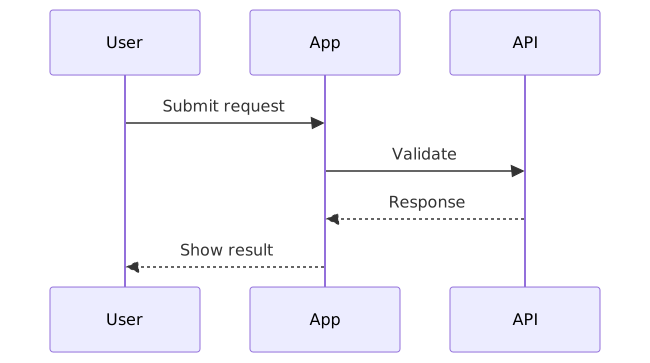
API Call
sequenceDiagram
    participant C as Client
    participant A as API Server
    participant D as Database

    C->>+A: GET /api/users
    A->>A: Validate JWT token
    A->>+D: SELECT * FROM users
    D-->>-A: User records
A-->>-C: 200 OK (JSON)OAuth Flow
sequenceDiagram
    actor User
    participant App as Client App
    participant Auth as Auth Server
    participant API as Resource Server

    User->>App: Click "Login with Google"
    App->>Auth: Redirect to /authorize
    Auth->>User: Show consent screen
    User->>Auth: Grant permission
    Auth-->>App: Authorization code
    App->>+Auth: POST /token (exchange code)
    Auth-->>-App: Access token + Refresh token
    App->>+API: GET /userinfo (Bearer token)
    API-->>-App: User profile
App-->>User: Logged inMicroservice Communication
sequenceDiagram
    autonumber
    participant GW as API Gateway
    participant US as User Service
    participant OS as Order Service
    participant PS as Payment Service
    participant NS as Notification Service

    GW->>+OS: Create Order
    OS->>+US: Validate User
    US-->>-OS: User Valid
    OS->>+PS: Process Payment
    PS-->>-OS: Payment OK
    OS->>NS: Send Confirmation (async)
OS-->>-GW: Order Created (201)WebSocket
sequenceDiagram
    participant C as Client
    participant S as Server

    C->>S: HTTP Upgrade Request
    S-->>C: 101 Switching Protocols
    Note over C,S: WebSocket connection established

    loop Real-time updates
        S-)C: Push notification
        C-)S: Acknowledge
    end

    C->>S: Close frame
    S-->>C: Close frame
Note over C,S: Connection closedCheckout
sequenceDiagram
    actor Customer
    participant Cart
    participant Inventory
    participant Payment
    participant Email

    Customer->>Cart: Proceed to checkout
    Cart->>+Inventory: Reserve items
    Inventory-->>-Cart: Items reserved

    Cart->>+Payment: Charge card
    alt Payment successful
        Payment-->>-Cart: Charge confirmed
        Cart->>Email: Send receipt
        Cart-->>Customer: Order confirmed!
    else Payment failed
        Payment-->>Cart: Charge declined
        Cart->>Inventory: Release items
        Cart-->>Customer: Payment failed
endGantt Charts

Sprint Planning
gantt
    title Sprint 15 — Feb 3-14
    dateFormat YYYY-MM-DD
    axisFormat %b %d
    excludes weekends

    section Backend
    Auth refactor        :done, b1, 2025-02-03, 3d
    API rate limiting    :active, b2, after b1, 2d
    Database migration   :b3, after b2, 2d

    section Frontend
    Dashboard redesign   :f1, 2025-02-03, 4d
    Mobile responsive    :f2, after f1, 3d

    section QA
    Integration tests    :q1, after b3 f2, 2d
Sprint review :milestone, m1, after q1, 0dProduct Launch
gantt
    title Product Launch Plan
    dateFormat YYYY-MM-DD
    axisFormat %b %d

    section Research
    Market analysis      :done, r1, 2025-01-06, 14d
    User interviews      :done, r2, 2025-01-06, 10d
    Requirements         :done, r3, after r1 r2, 5d

    section Development
    MVP build            :active, d1, after r3, 30d
    Beta testing         :d2, after d1, 14d
    Bug fixes            :d3, after d2, 7d

    section Launch
    Marketing prep       :l1, after d1, 21d
    Launch day           :milestone, crit, m1, after d3 l1, 0d
Post-launch support :l2, after m1, 14dSoftware Release
gantt
    title v2.0 Release Plan
    dateFormat YYYY-MM-DD
    axisFormat %b

    section Planning
    Architecture design  :done, a1, 2025-03-01, 10d
    Tech spec review     :done, a2, after a1, 5d

    section Development
    Core features        :active, d1, after a2, 20d
    API updates          :d2, after a2, 15d
    Frontend update      :d3, after d2, 10d

    section Quality
    Unit tests           :q1, after d1 d3, 5d
    Integration tests    :q2, after q1, 5d
    Performance tests    :crit, q3, after q2, 3d
    Security audit       :crit, q4, after q2, 3d

    section Release
    Staging deploy       :s1, after q3 q4, 2d
    UAT                  :s2, after s1, 5d
Production release :milestone, crit, m1, after s2, 0dClass Diagrams

E-commerce
classDiagram
    class Customer {
        +String id
        +String name
        +String email
        +placeOrder(items) Order
    }
    class Order {
        +String id
        +Date createdAt
        +String status
        +getTotal() Decimal
        +cancel() void
    }
    class OrderItem {
        +Product product
        +int quantity
        +Decimal unitPrice
    }
    class Product {
        +String id
        +String name
        +Decimal price
        +int stock
        +isInStock() bool
    }

    Customer "1" --> "*" Order : places
    Order "1" --> "1..*" OrderItem : contains
OrderItem "*" --> "1" Product : referencesMVC Pattern
classDiagram
    class Model {
        <<abstract>>
        #data: Map
        +getData() Map
        +setData(key, value) void
        +notify() void
    }
    class View {
        <<abstract>>
        -model: Model
        +render() void
        +update() void
    }
    class Controller {
        <<abstract>>
        -model: Model
        -view: View
        +handleInput(event) void
    }

    class UserModel {
        +String name
        +String email
    }
    class UserView {
        +render() void
        +showError(msg) void
    }
    class UserController {
        +handleLogin() void
        +handleLogout() void
    }

    Model <|-- UserModel
    View <|-- UserView
    Controller <|-- UserController
    Controller --> Model : updates
    Controller --> View : updates
View --> Model : readsObserver Pattern
classDiagram
    class Subject {
        <<interface>>
        +attach(observer) void
        +detach(observer) void
        +notify() void
    }
    class Observer {
        <<interface>>
        +update(subject) void
    }
    class EventEmitter {
        -observers: Observer[]
        +attach(observer) void
        +detach(observer) void
        +notify() void
    }
    class Logger {
        +update(subject) void
    }
    class Analytics {
        +update(subject) void
    }
    class UI {
        +update(subject) void
    }

    Subject <|.. EventEmitter
    Observer <|.. Logger
    Observer <|.. Analytics
    Observer <|.. UI
EventEmitter --> Observer : notifiesER Diagrams

Blog Platform
erDiagram
    USER {
        int id PK
        string username UK
        string email UK
        string password_hash
        datetime created_at
    }
    POST {
        int id PK
        string title
        string slug UK
        text content
        string status
        int author_id FK
        datetime published_at
    }
    COMMENT {
        int id PK
        text body
        int post_id FK
        int author_id FK
        datetime created_at
    }
    TAG {
        int id PK
        string name UK
    }
    POST_TAG {
        int post_id FK
        int tag_id FK
    }

    USER ||--o{ POST : writes
    USER ||--o{ COMMENT : writes
    POST ||--o{ COMMENT : has
    POST ||--o{ POST_TAG : has
TAG ||--o{ POST_TAG : taggedSaaS Multi-Tenant
erDiagram
    TENANT {
        int id PK
        string name
        string subdomain UK
        string plan
        datetime created_at
    }
    USER {
        int id PK
        int tenant_id FK
        string email
        string role
    }
    PROJECT {
        int id PK
        int tenant_id FK
        string name
        int owner_id FK
    }
    TASK {
        int id PK
        int project_id FK
        string title
        string status
        int assignee_id FK
        date due_date
    }

    TENANT ||--o{ USER : has
    TENANT ||--o{ PROJECT : owns
    USER ||--o{ PROJECT : manages
    PROJECT ||--o{ TASK : contains
USER ||--o{ TASK : assignedE-commerce DB
erDiagram
    CUSTOMER {
        int id PK
        string name
        string email UK
    }
    ADDRESS {
        int id PK
        int customer_id FK
        string street
        string city
        string zip
        string country
    }
    ORDERS {
        int id PK
        int customer_id FK
        int shipping_address_id FK
        string status
        decimal total
        datetime ordered_at
    }
    ORDER_ITEM {
        int id PK
        int order_id FK
        int product_id FK
        int quantity
        decimal unit_price
    }
    PRODUCT {
        int id PK
        string name
        string sku UK
        decimal price
        int category_id FK
    }
    CATEGORY {
        int id PK
        string name
        int parent_id FK
    }

    CUSTOMER ||--o{ ADDRESS : has
    CUSTOMER ||--o{ ORDERS : places
    ORDERS ||--|{ ORDER_ITEM : contains
    ORDER_ITEM }o--|| PRODUCT : references
    PRODUCT }o--|| CATEGORY : belongs_to
ORDERS }o--|| ADDRESS : ships_toState Diagrams

Order Lifecycle
stateDiagram-v2
    [*] --> Draft
    Draft --> Submitted : Place order
    Submitted --> Processing : Payment confirmed
    Submitted --> Cancelled : Cancel
    Processing --> Shipped : Ship items
    Shipped --> Delivered : Confirm delivery
    Delivered --> [*]
    Shipped --> Returned : Return request
    Returned --> [*]
Cancelled --> [*]UI Form States
stateDiagram-v2
    [*] --> Pristine
    Pristine --> Dirty : User types
    Dirty --> Validating : Blur / Submit
    Validating --> Valid : All rules pass
    Validating --> Invalid : Validation error
    Invalid --> Dirty : User edits
    Valid --> Submitting : Submit
    Submitting --> Success : 200 OK
    Submitting --> Error : Request failed
    Error --> Dirty : Edit & retry
Success --> [*]Connection States
stateDiagram-v2
    [*] --> Disconnected
    Disconnected --> Connecting : connect()
    Connecting --> Connected : Success
    Connecting --> Disconnected : Timeout
    Connected --> Disconnected : Connection lost

    state Connected {
        [*] --> Idle
        Idle --> Sending : send()
        Sending --> Idle : Ack received
        Idle --> Receiving : Data incoming
        Receiving --> Idle : Complete
}Pie Charts
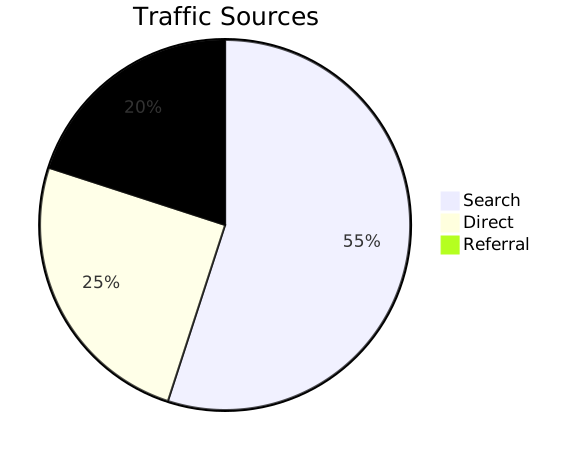
Browser Market Share
pie title Browser Market Share 2025
    "Chrome" : 65
    "Safari" : 19
    "Firefox" : 7
    "Edge" : 5
"Other" : 4Time Allocation
pie title Developer Weekly Time Allocation
    "Feature Development" : 40
    "Code Review" : 15
    "Meetings" : 15
    "Bug Fixes" : 12
    "Documentation" : 8
    "DevOps / CI" : 5
"Learning" : 5Tech Stack
pie title Project Tech Stack (Lines of Code)
    "TypeScript" : 45000
    "React Components" : 18000
    "CSS/Tailwind" : 12000
    "Python (API)" : 8000
    "SQL Migrations" : 3000
"Shell Scripts" : 1500Mind Maps

Project Planning
mindmap
    root((Project Plan))
        Research
            User Interviews
            Competitor Analysis
            Market Sizing
        Design
            Wireframes
            Visual Design
            Prototyping
        Development
            Frontend
                React Components
                State Management
            Backend
                API Design
                Database Schema
            DevOps
                CI/CD Pipeline
                Monitoring
        Launch
            Marketing
            Documentation
Support TrainingLearning Path
mindmap
    root((Full Stack Developer))
        Frontend
            HTML & CSS
                Semantic HTML
                Flexbox & Grid
                Responsive Design
            JavaScript
                ES6+ Features
                Async/Await
                TypeScript
            Frameworks
                React / Next.js
                Vue / Nuxt
        Backend
            Node.js
                Express
                Fastify
            Databases
                PostgreSQL
                MongoDB
                Redis
            APIs
                REST
                GraphQL
        DevOps
            Docker
            CI/CD
AWS / GCPContent Strategy
mindmap
    root((Content Strategy))
        Blog Articles
            Tutorials
            Case Studies
            Industry Analysis
        Social Media
            Twitter Threads
            LinkedIn Posts
            YouTube Videos
        Email Marketing
            Weekly Newsletter
            Drip Campaigns
            Product Updates
        Community
            Discord Server
            GitHub Discussions
WebinarsGit Graphs
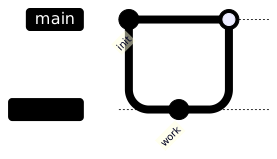
Feature Branch
gitGraph
    commit id: "init"
    commit id: "setup"
    branch feature/auth
    checkout feature/auth
    commit id: "add login"
    commit id: "add signup"
    commit id: "add tests"
    checkout main
    commit id: "hotfix"
    merge feature/auth id: "merge auth"
commit id: "release v1.1"GitFlow
gitGraph
    commit id: "init"
    branch develop
    checkout develop
    commit id: "dev setup"
    branch feature/users
    commit id: "user model"
    commit id: "user API"
    checkout develop
    merge feature/users
    branch feature/orders
    commit id: "order model"
    commit id: "order API"
    checkout develop
    merge feature/orders
    branch release/v1.0
    commit id: "bump version"
    commit id: "fix bug"
    checkout main
    merge release/v1.0 id: "v1.0" tag: "v1.0"
    checkout develop
    merge release/v1.0