How to Document REST APIs with Mermaid Sequence Diagrams
Learn how to use Mermaid sequence diagrams to document REST API flows, authentication, error handling, and microservice interactions — with copy-paste examples.
# How to Document REST APIs with Mermaid Sequence Diagrams
Every API has a story. A client sends a request, an auth layer checks credentials, a service does work, a database gets queried, and a response comes back. That story is almost impossible to communicate clearly in prose — but a sequence diagram tells it in seconds.
Mermaid's sequence diagram syntax is purpose-built for exactly this. You write plain text, and it renders into a crisp interaction diagram that lives right next to your code, your README, or your wiki. No Visio license, no drag-and-drop fatigue.
This guide shows you how to document real API patterns — auth flows, CRUD operations, error handling, and microservice chains — using Mermaid sequence diagrams you can paste directly into your docs today.
---
Why Sequence Diagrams for APIs?
Other diagram types show *structure*. Sequence diagrams show *behavior over time* — which is exactly what an API consumer needs to understand:
- Who initiates the call
- What gets checked before the work happens
- What happens when something fails
- Which systems talk to each other and in what order
Sequence diagrams are also the most universally understood diagram type among developers. Even non-technical stakeholders can follow the left-to-right, top-to-bottom flow.
---
Basic REST API Request
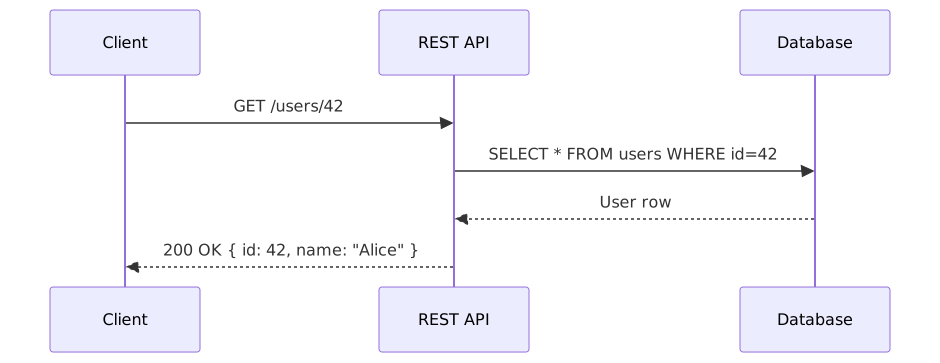
Let's start simple. A client fetches a user record:
sequenceDiagram
    participant Client
    participant API as REST API
    participant DB as Database

    Client->>API: GET /users/42
    API->>DB: SELECT * FROM users WHERE id=42
    DB-->>API: User row
API-->>Client: 200 OK { id: 42, name: "Alice" }Note the arrow types: ->> for requests (solid line), -->> for responses (dashed line). This visual distinction immediately shows direction and intent.
---
JWT Authentication Flow
Auth is where sequence diagrams really shine. Here's a complete JWT login + protected request flow:
sequenceDiagram
    participant User
    participant API as REST API
    participant Auth as Auth Service
    participant DB as Database

    User->>API: POST /auth/login { email, password }
    API->>Auth: Validate credentials
    Auth->>DB: SELECT user WHERE email=?
    DB-->>Auth: User record
    Auth->>Auth: bcrypt.compare(password, hash)
    Auth-->>API: Valid ✓
    API-->>User: 200 OK { access_token, refresh_token }

    Note over User,API: Later — authenticated request

    User->>API: GET /profile (Authorization: Bearer <token>)
    API->>Auth: Verify JWT signature
    Auth-->>API: { userId: 42, role: "admin" }
    API->>DB: SELECT * FROM profiles WHERE userId=42
    DB-->>API: Profile data
API-->>User: 200 OK { profile }The Note instruction lets you annotate a moment in time — perfect for explaining context between steps.
---
API Error Handling Paths
Good API docs show the unhappy paths too. Use alt blocks to branch on conditions:
sequenceDiagram
    participant Client
    participant API as REST API
    participant DB as Database

    Client->>API: DELETE /posts/99

    alt Post exists and user owns it
        API->>DB: DELETE FROM posts WHERE id=99
        DB-->>API: 1 row affected
        API-->>Client: 204 No Content
    else Post not found
        API-->>Client: 404 Not Found { error: "Post not found" }
    else User does not own post
        API-->>Client: 403 Forbidden { error: "Not your post" }
endThe alt/else/end block maps directly to your API's conditional logic. Anyone reading the diagram instantly understands the three possible outcomes without reading a line of code.
---
Microservice Chain
Modern APIs rarely live alone. Here's an e-commerce order placement flow across services:
sequenceDiagram
    participant App as Mobile App
    participant GW as API Gateway
    participant Order as Order Service
    participant Inventory as Inventory Service
    participant Payment as Payment Service
    participant Notify as Notification Service

    App->>GW: POST /orders { items, payment }
    GW->>Order: Create order
    Order->>Inventory: Reserve items
    Inventory-->>Order: Reserved ✓
    Order->>Payment: Charge card
    Payment-->>Order: Charged ✓
    Order-->>GW: Order #1042 created
    GW-->>App: 201 Created { orderId: 1042 }

Order-)Notify: (async) Send confirmation emailThe -) arrow (vs ->>) denotes an async message — the order service fires the notification and doesn't wait for a response. That single character change communicates a meaningful architectural decision.
---
Pagination and Cursor-Based APIs
sequenceDiagram
    participant Client
    participant API as REST API

    Client->>API: GET /posts?limit=20
    API-->>Client: 200 OK { data: [...], next_cursor: "abc123" }

    loop Until no next_cursor
        Client->>API: GET /posts?limit=20&cursor=abc123
        API-->>Client: 200 OK { data: [...], next_cursor: "def456" }
    end

    Client->>API: GET /posts?limit=20&cursor=xyz999
API-->>Client: 200 OK { data: [...], next_cursor: null }The loop block lets you model repeated behavior without drawing 50 identical arrows. Essential for polling, pagination, and retry logic.
---
OAuth 2.0 Authorization Code Flow
This one's a classic that trips up a lot of developers to explain verbally:
sequenceDiagram
    participant User
    participant App as Your App
    participant AuthServer as Auth Server
    participant Resource as Resource Server

    User->>App: Click "Login with Google"
    App->>AuthServer: Redirect to /authorize?client_id=...&scope=...
    AuthServer->>User: Show login + consent screen
    User->>AuthServer: Grant permission
    AuthServer->>App: Redirect to callback?code=AUTH_CODE
    App->>AuthServer: POST /token { code, client_secret }
    AuthServer-->>App: { access_token, refresh_token }
    App->>Resource: GET /userinfo (Bearer access_token)
    Resource-->>App: { id, email, name }
Try explaining that in words. The diagram does it in 9 lines.
---
Tips for Clean API Sequence Diagrams
Use aliases for long participant names. participant DB as PostgreSQL Database keeps the diagram readable without truncating names in the boxes.
Keep it to one flow per diagram. Don't cram the login flow, the data fetch, and the logout into one diagram. Split them. Smaller diagrams are easier to maintain and easier to understand.
Show the response body when it matters. API-->>Client: 200 OK { token } is more useful than API-->>Client: Success.
Use activate/deactivate to show when a service is actively processing:
sequenceDiagram
    participant Client
    participant API

    Client->>API: POST /report/generate
    activate API
    API-->>Client: 202 Accepted { jobId: 99 }
    Note right of API: Processing in background...
deactivate API---
Where to Put Your API Diagrams
README.md on GitHub — GitHub renders Mermaid natively in markdown. Drop a `mermaid block directly in your README.
OpenAPI / Swagger — Swagger UI doesn't render Mermaid, but your description fields support markdown. Link to a docs page that has the diagrams.
Confluence or Notion — Both support Mermaid via plugins (Confluence) or code blocks (Notion). Put diagrams next to endpoint tables.
Your own docs site — Docusaurus, VitePress, and Nextra all support Mermaid out of the box.
If you want to quickly draft a diagram before committing it, mermaideditor.lol gives you an instant preview with no setup — paste, tweak, export.
---
Sequence Diagram Quick Reference
| Syntax | Meaning |
|---|---|
| `A->>B: message` | Synchronous request |
| `A-->>B: message` | Response (dashed) |
| `A-)B: message` | Async fire-and-forget |
| `activate A` | Show A as active (lifeline box) |
| `deactivate A` | End active state |
| `Note over A,B: text` | Annotation spanning participants |
| `alt condition` ... `else` ... `end` | Conditional branch |
| `loop label` ... `end` | Repeated interaction |
| `opt label` ... `end` | Optional block |
| `par` ... `and` ... `end` | Parallel actions |
---
Start Documenting Your API Now
Better API documentation isn't about buying a tool. It's about spending 10 minutes turning an API flow into a diagram your whole team can read.
Grab any endpoint from your current project, trace the call from client to database and back, and build a sequence diagram. You'll immediately spot assumptions you've been carrying around without realizing it.
Try the examples above live → mermaideditor.lol
Paste any diagram from this guide, see it render instantly, and export it as SVG or PNG when you're ready to share.
---
*Related: Mermaid Sequence Diagram Tutorial · Mermaid C4 Architecture Diagrams · Mermaid Cheat Sheet*